


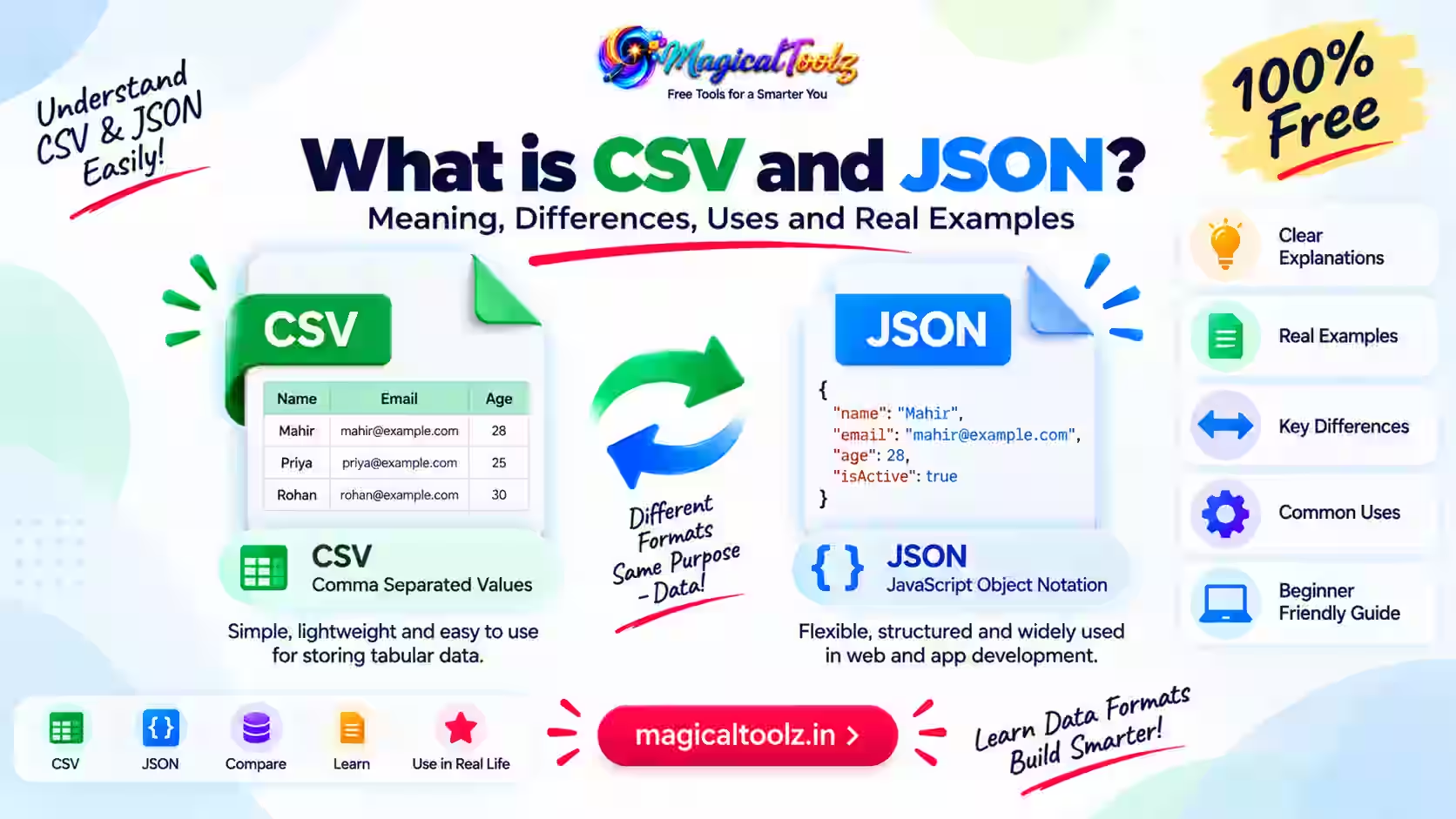
CSV and JSON both move structured data between programs, but they describe that data differently. CSV is a row-and-column text format. JSON can represent objects, arrays, strings, numbers, booleans, and null values, including nested structures.
When you convert CSV to JSON, you often treat the first CSV row as property names and turn each following row into a JSON object. That simple rule works for clean tables, but delimiters, quoted fields, duplicate headers, encodings, and data types require deliberate choices.
Quick answer: Use CSV for flat tabular exchange and JSON for structured application data. Before converting, confirm the delimiter, header row, encoding, empty-value rules, and required JSON shape. Always inspect the result.
CSV and JSON at a glance
| Feature | CSV | JSON |
| Basic shape | Rows containing fields | Objects, arrays, and primitive values |
| Column names | Usually an optional first row | Property names inside objects |
| Data types | Fields are text unless another system applies a schema | Strings, numbers, booleans, null, objects, and arrays |
| Nesting | No standard nested object model | Objects and arrays can nest |
| Common use | Spreadsheets, imports, exports, reports | APIs, configuration, application data |
| Typical media type | text/csv | application/json |
What CSV actually defines
CSV means comma-separated values, but real files do not all follow one identical dialect. RFC 4180 documents a common format: records appear on separate lines, fields are separated by commas, a header may be present, and fields containing commas, quotes, or line breaks can be enclosed in double quotes.
A double quote inside a quoted field is commonly represented by two double quotes. This means a CSV parser must understand quoted fields. Splitting every line at each comma will corrupt addresses, descriptions, and names that contain commas.
Some files use semicolons, tabs, pipes, or locale-specific conventions despite being called CSV. Confirm the delimiter instead of guessing from the filename alone.
What JSON actually defines
RFC 8259 defines JSON as a text format for structured values. An object contains name-value members. An array contains ordered values. Values can also be strings, numbers, true, false, or null.
JSON strings use double quotes and special characters require escaping. Comments, trailing commas, NaN, and Infinity are not part of standard JSON. A JavaScript object literal may look similar while still being invalid JSON.
JSON property names should be treated carefully. Duplicate names can produce unpredictable results because software may keep the first value, keep the last, report an error, or expose all duplicates.
A basic CSV-to-JSON mapping
Consider a CSV file with the headers name, city, and active. Each later row can become one object, and all objects can be placed inside a JSON array.
The important question is whether active should remain the string "true" or become the JSON boolean true. CSV itself does not settle that choice. The destination schema must decide.
The same issue applies to ages, prices, dates, phone numbers, postal codes, identifiers, and empty fields. Conversion is partly a data-modelling task, not just punctuation replacement.
How to prepare a CSV file
- Keep one logical record per row.
- Use a consistent number of fields across rows.
- Choose one delimiter and document it.
- Put clear, unique column names in the first row when headers are used.
- Quote fields that contain delimiters, quotes, or line breaks.
- Save the file with a known character encoding, commonly UTF-8.
- Decide how empty fields differ from missing values.
- Keep a backup before cleaning or converting the source.
Do not manually remove quote characters from a valid CSV file. A compliant parser needs them to distinguish content from separators.
Headers become JSON property names
Clean headers such as order_id, customer_name, and total create predictable JSON. Blank, repeated, or inconsistent headers create ambiguity.
If two columns share the same header, a JSON object cannot preserve both reliably under the same property name. Rename the columns before conversion or use an explicit structure that retains their positions.
Whitespace also matters. The headers email and email may look similar but become different property names unless trimmed. Record every normalization rule so repeat conversions behave consistently.
Data type inference can damage values
Automatic conversion may turn a field that looks numeric into a JSON number. That can remove leading zeroes from postal codes, account identifiers, product codes, and phone numbers. A large integer can also exceed the exact numeric range of some software.
Dates are another risk. A value such as 01/02/2026 is ambiguous across regions. JSON has no built-in date type, so dates are normally represented as strings under an agreed format.
Define your schema before conversion. Mark identifiers as strings, measurements as numbers, true/false fields as booleans, and missing values according to the destination's contract.
Empty, missing, and null are different
An empty CSV field can mean an empty string, unknown data, a missing value, zero, or “not applicable.” JSON can represent an empty string as "", a deliberate absence as null, or omit the property completely.
Those choices are not equivalent. An API may interpret an omitted property as “leave unchanged,” while null means “clear this value.” Confirm the receiving system's rules before converting production data.
Do not replace every blank with zero or null unless the data owner has approved that meaning.
Flat CSV cannot reveal nested JSON automatically
A table can describe customers and orders, but it does not inherently say where one object should nest inside another. Repeated customer details might represent separate records, a one-to-many relationship, or accidental duplication.
Headers such as address.city or items[0].sku may imply nesting in a particular tool, but that is a convention rather than universal CSV behavior. Another converter may keep those headers as literal property names.
For nested output, define the target JSON schema and grouping keys first. Then transform rows using rules written for that schema.
Character encoding and damaged text
A CSV file may be saved as UTF-8, a regional Windows encoding, or another character set. If a converter reads the wrong encoding, names and symbols can become replacement characters or unreadable text.
JSON exchanged between systems should use UTF-8 for interoperability. Detect or confirm the CSV encoding before parsing, and inspect non-English names, currency symbols, punctuation, and emoji in the result.
A UTF-8 byte order mark at the beginning of a CSV file may become part of the first header when software does not handle it. If the first JSON key looks unusual, inspect the source bytes.
Large files need limits and streaming
Loading an entire CSV and its complete JSON output into browser memory can require several times the source file size. Large files may freeze a tab or fail on a low-memory device.
For production-scale conversion, use a streaming parser, process records in chunks, apply row and field limits, and write output incrementally. Validate early so one malformed record does not silently shift every later column.
Measure the generated JSON size as well as the source CSV size. Repeating property names for every row can make JSON substantially larger.
CSV formula injection is a separate risk
Spreadsheet applications may interpret cells beginning with characters such as =, +, -, or @ as formulas. Untrusted CSV content can therefore become dangerous when someone later opens or exports it in a spreadsheet.
Converting that value to JSON does not prove it safe. If the data may return to CSV or a spreadsheet, preserve the original value and apply destination-specific neutralisation at export time. Avoid destructive cleaning that changes legitimate data without a documented policy.
A reliable conversion workflow
- Identify the source delimiter, quoting rules, headers, and encoding.
- Validate that each record has the expected field count.
- Resolve blank and duplicate headers.
- Define the target properties and data types.
- Specify rules for blanks, nulls, dates, identifiers, and booleans.
- Convert a small sample first.
- Validate the JSON syntax and target schema.
- Compare sample records with the original CSV.
- Convert the complete file with size and error limits.
- Keep the source and a conversion log until the destination accepts the data.
Troubleshooting common failures
Rows have the wrong number of columns
A quoted comma, embedded line break, unmatched quote, or wrong delimiter may have confused the parser. Use a CSV-aware parser and inspect the first failing record.
Leading zeroes disappeared
The converter inferred a number. Mark identifiers, phone numbers, and postal codes as strings.
JSON parsing fails
Check double quotes, escaping, commas, control characters, and whether the output is complete. JSON does not allow trailing commas or comments.
Accented characters look wrong
The source encoding was likely interpreted incorrectly. Reopen the original with the correct encoding and convert again.
Two columns became one property
The CSV probably had duplicate headers. Rename them before mapping rows to JSON objects.
The output is much larger
JSON repeats property names for each object and adds structural punctuation. That overhead is normal for row-to-object conversion.
Protect private and production data
CSV exports often contain customer details, financial records, employee data, or authentication-related information. Use an approved environment and follow retention rules. Remove unnecessary fields before sharing a sample.
Do not paste confidential production data into an unknown online converter. Local processing can reduce server transfer, but browser extensions, downloads, clipboard history, and synced folders still matter.
Use synthetic records for testing when possible. If real data is required, restrict access and securely remove temporary files.
Verify the converted result
Count your source records and output objects, then compare the first, last, and several random records. Check identifiers with leading zeroes, quoted multiline fields, non-English text, blank values, and the largest numeric values.
Validate the output against a JSON Schema when the receiving system provides one. A round-trip test can also reveal loss: convert a sample back to the agreed CSV shape and compare field values. The files may not be byte-for-byte identical, but the defined data should remain equivalent.
Record rejected rows separately with safe error details. Silently skipping malformed records can produce a valid JSON file that is incomplete.
Frequently asked questions
Is CSV the same as an Excel file?
No. CSV is plain text and does not preserve workbook sheets, formulas, formatting, charts, or cell types.
Does every CSV use commas?
No. Files called CSV may use semicolons, tabs, pipes, or locale-specific separators.
Can CSV store nested JSON?
Not through a universal CSV structure. You need an agreed convention or explicit transformation rules.
Should numbers be converted automatically?
Only when a schema confirms they are numeric. Identifiers and codes often need to remain strings.
What should an empty CSV field become?
It may become an empty string, null, or an omitted property. The destination contract must decide.
Why are quoted commas important?
A comma inside a quoted field is content, not a column separator. Simple string splitting breaks it.
Can I convert a huge file in a browser?
It depends on memory and implementation. Large production files are safer with a bounded streaming workflow.
Does valid JSON mean the data is correct?
No. Syntax validation does not confirm types, business rules, completeness, or accuracy.
Treat conversion as data mapping
A dependable CSV-to-JSON conversion starts with the source dialect and ends with a validated target schema. The punctuation change is easy; preserving meaning is the real task.
Document the rules, test representative records, and keep the original file until the receiving system confirms that the converted data is correct.
 Magical Toolz AI Support
Comments (0)
Use comments for article-specific feedback. Use the contact page for bugs and support requests.
Leave a Comment
No comments yet. Be the first to share something useful.