


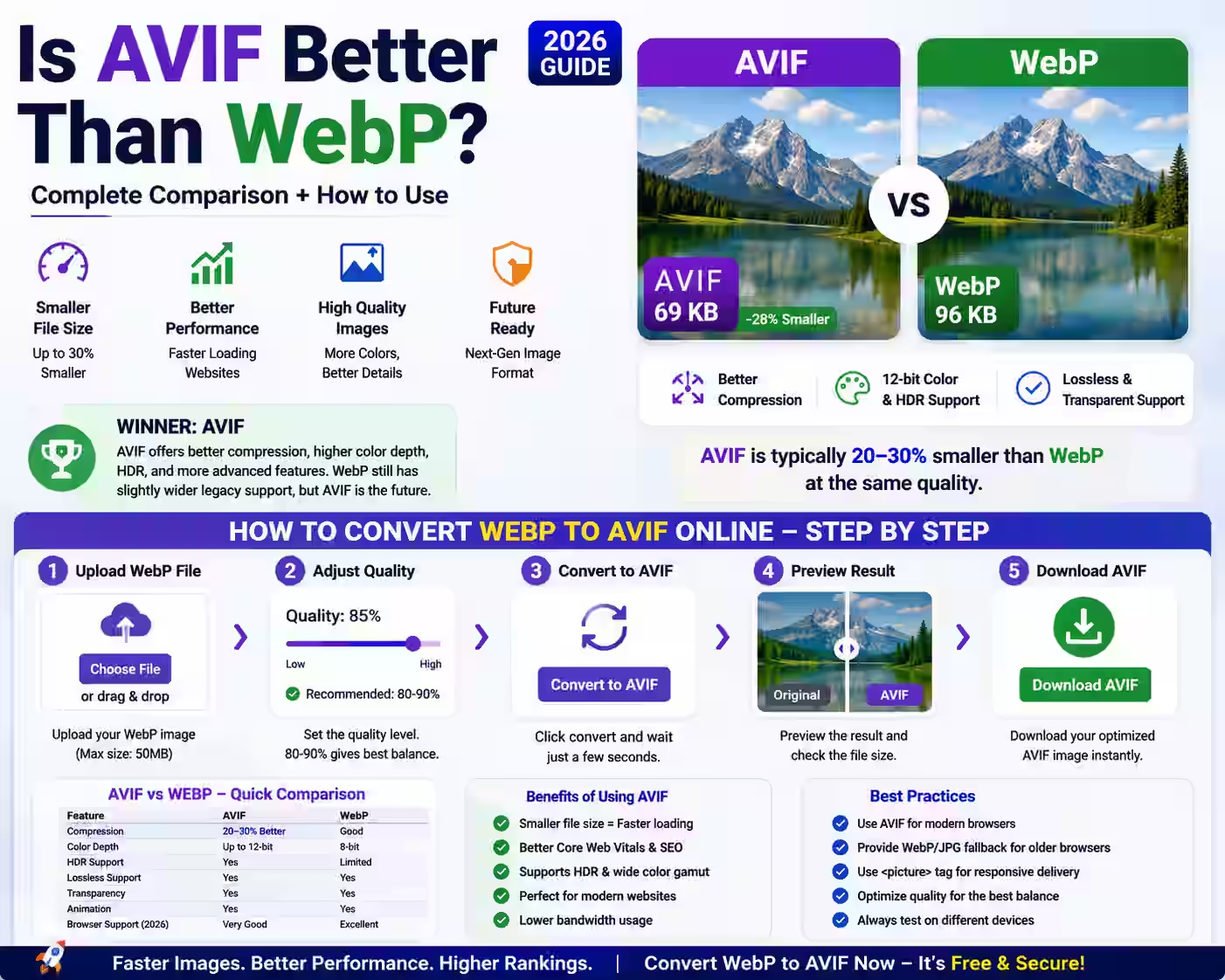
If you manage a website, run an online store, or publish blog content, you have likely asked yourself, is AVIF better than WebP? This question is critical in 2026 because image compression directly impacts page speed, user experience, and search engine rankings. The short answer is yes—AVIF typically offers 20–30% better compression than WebP at the same visual quality. However, the best format depends on your specific needs. In this complete guide, we will break down the AVIF vs WebP debate, show you exactly how to convert WebP to AVIF using a free online tool, and explain why next-gen image compression is essential for your website today.
Understanding the AVIF vs WebP Debate
Both WebP and AVIF are next-generation image formats designed to replace older standards like JPEG and PNG. WebP, developed by Google and released in 2010, has been the industry standard for over a decade. It reduces file sizes by 25–35% compared to JPEG while maintaining similar quality. AVIF, created by the Alliance for Open Media and finalized in 2019, takes compression even further. When comparing AVIF vs WebP, AVIF consistently delivers smaller file sizes—often 20–30% smaller than WebP—while supporting advanced features like HDR (High Dynamic Range), 10-bit color depth, and lossless compression for specific use cases.
For general users who simply want faster websites and better-looking images, AVIF is the clear winner in raw compression efficiency. However, WebP still holds an edge in browser compatibility. As of July 3, 2026, AVIF is supported by all major browsers including Chrome, Firefox, Safari, and Edge, but some older devices and legacy systems may still prefer WebP. The good news is that you can use both formats strategically—and our free online converter makes the process seamless.
Why AVIF Compression Matters for Your Website
Image files are often the largest assets on any webpage. A single high-resolution photo can be 2–5 MB in JPEG format. By using AVIF compression, you can reduce that file size by up to 50% without any visible loss in quality. This directly translates to faster page load times, lower bandwidth costs, and improved Core Web Vitals scores—especially Largest Contentful Paint (LCP). Google has confirmed that page speed is a ranking factor, so switching to AVIF can give your site a measurable SEO boost.
Additionally, AVIF supports transparency (alpha channels) and animation, making it a versatile alternative to both PNG and GIF. For e-commerce owners, this means product images load instantly even on slow mobile connections. For bloggers, it means your high-quality photos won't slow down your readers' experience. The AVIF file size advantage is undeniable, which is why we recommend converting your WebP images to AVIF today.
How to Convert WebP to AVIF Online – Step-by-Step Guide
Converting your images is simple with the MagicalToolz WebP to AVIF converter. You do not need to install any software, create an account, or pay a single cent. Follow these steps to convert WebP to AVIF online in under 30 seconds:
- Visit the MagicalToolz WebP to AVIF Converter – Open your browser and go to the dedicated converter page at MagicalToolz.in. The interface is clean and intuitive, designed for non-technical users.
- Upload Your WebP File – Click the "Choose File" button or drag and drop your WebP image directly onto the upload area. The tool supports files up to 50 MB, which covers most standard web images.
- Adjust Quality Settings (Optional) – Use the slider to set the compression level. For most use cases, a quality setting of 80–90% offers the best balance between file size and visual fidelity. The tool shows a real-time preview of the output.
- Click "Convert to AVIF" – The conversion process takes just a few seconds. The tool uses advanced AVIF encoding to preserve fine details while minimizing file size.
- Download Your AVIF File – Once the conversion is complete, click the download button. Your new AVIF image is ready to use on your website, social media, or digital projects.
That is all there is to it. The entire process is designed to be fast, secure, and hassle-free. No personal data is stored, and all uploads are automatically deleted after conversion. You can repeat the process as many times as you need.
AVIF vs WebP Compression: A Technical Comparison
To help you understand the practical differences, here is a breakdown of AVIF vs WebP compression across key metrics:
- File Size: AVIF typically reduces file size by an additional 20–30% compared to WebP at the same subjective quality. For example, a 100 KB WebP image can become a 70–80 KB AVIF file.
- Color Depth: WebP supports 8-bit color (256 colors per channel). AVIF supports up to 12-bit color, enabling smoother gradients and HDR content.
- Lossless Compression: Both formats support lossless compression, but AVIF's lossless mode is more efficient for complex graphics and screenshots.
- Animation: WebP supports animated images (like GIFs). AVIF also supports animation with better compression and higher quality.
- Transparency: Both formats support alpha channels (transparency), but AVIF handles semi-transparency more accurately.
For most general users, the key takeaway is that AVIF offers superior compression without sacrificing quality. If you are optimizing images for a modern audience, AVIF is the best choice.
Frequently Asked Questions
Is AVIF better than WebP for SEO?
Yes, because AVIF produces smaller file sizes than WebP at the same quality level. Smaller files load faster, which improves your Core Web Vitals scores (especially LCP and FID). Google uses these metrics as ranking signals, so switching to AVIF can indirectly improve your search engine rankings. However, ensure your server delivers the correct MIME type (image/avif) so browsers can render the files properly.
Can I use AVIF images on all browsers in 2026?
Yes, as of July 3, 2026, AVIF is supported by all major browsers including Google Chrome (version 85+), Mozilla Firefox (version 93+), Apple Safari (version 16.1+), and Microsoft Edge (version 85+). For older browsers that do not support AVIF, you can implement a fallback to WebP or JPEG using the HTML picture element.
How much smaller is an AVIF file compared to WebP?
On average, AVIF files are 20–30% smaller than WebP files at the same visual quality. In some cases, especially with photographic content, the savings can reach up to 50%. The exact reduction depends on the complexity of the image and the compression settings you choose.
Is it free to convert WebP to AVIF online?
Absolutely. The MagicalToolz WebP to AVIF converter is completely free to use. There are no hidden fees, no subscription plans, and no limits on the number of conversions. You can use it as often as you need for personal or commercial projects.
Will converting to AVIF lose image quality?
If you use the default quality setting (around 85%), the visual difference between the original WebP and the converted AVIF will be imperceptible to the human eye. The AVIF format is designed to preserve fine details while aggressively reducing file size. You can also increase the quality slider to 95–100% if you need maximum fidelity for professional photography.
Practical Tips for Using AVIF on Your Website
Once you have converted your images, follow these best practices to maximize performance:
- Use the picture element with fallbacks – Serve AVIF to modern browsers and fall back to WebP or JPEG for older ones. This ensures every user sees your images correctly.
- Batch convert your library – Do not convert images one by one. Use our online tool to convert multiple WebP files in sequence. For large libraries, consider using a script or plugin that supports AVIF.
- Monitor your Lighthouse score – After replacing your WebP images with AVIF, run a Google Lighthouse test. You should see improvements in the "Efficiently encode images" audit and overall performance score.
- Test on mobile devices – AVIF performs exceptionally well on mobile networks where bandwidth is limited. Test your site using Chrome DevTools with network throttling enabled to see the real-world impact.
Conclusion: Make the Switch to AVIF Today
So, is AVIF better than WebP? For virtually every use case in 2026—blogging, e-commerce, social media, and web development—the answer is a definitive yes. AVIF delivers superior compression, supports modern features like HDR, and is now supported by all major browsers. By converting your WebP images to AVIF, you can reduce your page load times, improve your SEO performance, and provide a better experience for your visitors.
Do not let outdated image formats hold your website back. Convert WebP to AVIF now using our free online tool—no signup required, no limits, and no compromises. Your users will thank you for the faster experience, and your search rankings will reflect the improvement.
Try our free WebP to AVIF Converter right now and see the difference next-gen compression makes.
 Magical Toolz AI Support
Comments (0)
Use comments for article-specific feedback. Use the contact page for bugs and support requests.
Leave a Comment
No comments yet. Be the first to share something useful.