


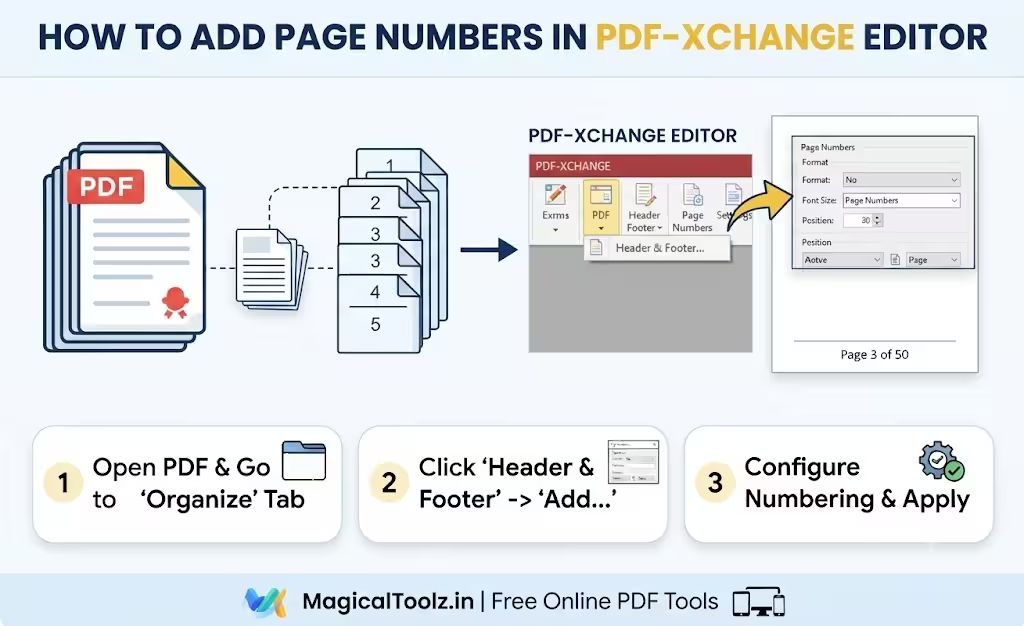
Page numbers are boring in the best way
Nobody opens a PDF hoping to think about page numbering. They notice it when it is missing. Suddenly the file feels harder to skim, harder to quote, and harder to discuss with someone else. A simple page number turns a wandering document into something you can point to with confidence.
That is the whole trick.
Page numbers do not make a PDF "better" in some abstract design sense. They make it easier to use. If you are sharing reports, drafts, handouts, manuals, or decks, that small marker at the top or bottom can save everyone time. It gives the reader a place to land when they say, "Go to page 7."
Why people search for add page numbers to PDF
The search usually starts when a document has already grown up a little. Maybe it began as a one-page note and turned into a multi-page report. Maybe someone exported a presentation to PDF and realized the audience needs a way to follow the order. Maybe a teacher, client, or reviewer wants each page numbered before they print it out.
That is when phrases like "add page numbers to PDF", "page x of y PDF", and "number pages in PDF online" start showing up in search bars. People are not chasing a fancy feature. They are trying to make a document easier to reference.
Simple need. Real deadline.
Good to knowPage numbers help when people print, review, or quote a PDF. They also make it easier to talk about a file over email or in a meeting, because everyone can point to the same page without guessing.
A browser-based PDF page number tool fits a very specific kind of job
If you only need to number a PDF once, opening a huge desktop app can feel like too much. A browser-based tool is useful when you want to stay in the tab you already have open and just get the numbering done. The Add Page Numbers to PDF tool on this site runs entirely in your browser, so the file does not need to bounce through a server just to get a page label added.
That matters for two reasons. First, it keeps the process simple. Second, it makes the workflow feel less heavy than launching a full editing suite for something that is mostly mechanical.
Tiny task. Tiny friction.
The position of the number changes how the PDF feels
Page numbers can sit at the top, bottom, left, or right depending on what you need. In some documents, a centered footer looks clean and calm. In others, a corner placement keeps the number out of the way of tables, diagrams, or scanned text. There is no single right answer, because the page itself decides what will look awkward.
That is why position controls matter. A report with charts usually needs different spacing from a training handout or a legal-style draft. A good page numbering tool does not force one style on every file. It gives you enough control to keep the document readable.
Placement changes everything.
Why the starting number matters more than you think
If you are numbering a PDF that is part of a bigger packet, you may not want to start at 1. Maybe this file is the second half of a bundle. Maybe it should continue from a previous draft. Maybe the document was already numbered during an earlier stage and you need the new export to keep that order.
That is where a starting number option is helpful. It lets you keep the numbering honest without forcing every file back to the beginning. It sounds like a tiny setting. It saves a lot of confusion later.
"Page 3 of 12" is useful because it gives context
Plain page numbers tell you where you are. Page count formatting tells you where you are and how far you still have to go. That is why "Page [P] of [T]" remains such a common pattern. It answers a question before anyone asks it. Readers know both the current page and the total length, which is especially handy in long reports and review drafts.
The tool uses that style as the default format string, and that is a nice choice because it feels familiar immediately. It is the kind of label people understand without reading instructions.
Clear context. Less back-and-forth.
ExampleYou export a six-page project brief and send it to a client for comments. With page numbers in place, they can say "see page 4" instead of describing the chart or the heading from memory. That sounds minor, but it makes review calls much smoother.
Why PDFs without numbers feel harder to edit and discuss
When a PDF has no numbering, every conversation about it takes longer. Someone opens the file and says, "The table near the end looks off." Another person has to scroll around and guess which page they mean. Even if the document is short, that tiny delay repeats itself over and over.
Once the file is numbered, everyone gets a shared map. You can write notes, mention page references in email, and keep feedback from drifting into vague descriptions. That is useful for design reviews, proofreading, training documents, and client handoffs.
Shared labels save real time.
Position, size, and color are about legibility
Page numbers should be visible without shouting. The font size needs to be large enough to read, but not so large that it steals space from the page. The text color should fit the background. A dark number on a light page is easy. A light number on a light page is a bad day.
That is why even basic numbering tools should let you adjust size and color. The point is not decoration. The point is legibility. If someone has to squint to find the page number, the feature has already failed.
Readable wins.
Watch for thisIf your PDF already has page numbers inside the content, adding a new overlay can make the file look crowded. Check the layout first so you do not double up numbers in the same place.
Why browser-side processing feels nice here
The page-numbering workflow is naturally a local task. You are not editing the actual content. You are placing a label on each page. Doing that in the browser keeps the process quick and private, and it avoids a round trip just to adjust a repeating footer. The file stays on your side while the numbering is added.
That is especially comfortable for reports, internal drafts, and anything that should not need a server hop just to get a page label. Small job, local action.
Different documents need different numbering styles
A report may want a simple centered footer. A training manual may want "Page X of Y" in the corner. A draft for review may need a smaller, more subtle label so it does not distract from the content. There is no single page-number style that works for every file, because the file itself changes the answer.
That is why custom format strings are handy. You can keep the number plain or include the total pages if that helps readers understand the structure faster. The tool gives you a little room, and that room matters.
The big win is not the number itself
What you really gain is easier navigation. Page numbering makes a PDF feel less like a blob and more like a sequence. That matters whether the file is five pages or fifty. People read documents in chunks, not just from beginning to end, and numbering helps them jump around without losing the thread.
It also helps when the PDF gets printed. Paper copies do not have tabs, thumbnails, or search. Page numbers become the quickest way to keep everyone oriented.
Paper still likes page numbers.
A simple habit that pays off
If you often export PDFs from reports, presentations, or scans, make page numbering part of the final review step. It is the kind of fix that is easy to forget and annoying to add later. Once you get used to it, the documents you send out feel more polished without needing a redesign.
That is the real value here. Not flair. Not drama. Just a file that is easier to follow, easier to quote, and easier to share with another human.
Frequently Asked Questions
Why add page numbers to a PDF?
It makes the document easier to reference, print, review, and discuss.
Can I start page numbering from a number other than 1?
Yes, that is useful when the PDF is part of a larger packet or a continued draft.
What does "Page X of Y" mean?
It shows the current page and the total number of pages.
Does numbering a PDF change the content inside the pages?
No, it adds page labels on top of the pages rather than rewriting the actual document text.
Can browser-based PDF page numbering be private?
Yes, the tool on this site works in your browser instead of sending the file to a server.
What if my PDF already has page numbers?
Check the layout carefully so you do not add a second set in the same spot.
 Magical Toolz AI Support
Comments (0)
Use comments for article-specific feedback. Use the contact page for bugs and support requests.
Leave a Comment
No comments yet. Be the first to share something useful.